
SigmaNext 2026: WPP Submission
- New students: you are required to take the Entrance Exam (EE). Please submit your EE solutions here.
- Returning students (attended any previous SigmaCamp or SigmaNext): you are not required to submit the EE solutions. Instead, please submit the Workspace Project Proposal (WPP) through the form below. You are considered a returning student only if you have attended camps in the U.S. (not Brazil)
At SigmaNext, students play an active role in shaping what they learn. As a returning SigmaCamper, you will propose a workspace project: a focused project in Math, Physics, Biology, Chemistry, or Computer Science. Each workspace project runs for 1, 2, or 3 days and meets for one hour each evening.
How to Approach the Proposal
For example, previous SigmaNext Workspace projects have included:
- Using a Leeuwenhoek microscope (Physics)
- Minkowski’s Convex Body Theorem (Mathematics)
- Creating custom plastics (Chemistry)
- Comparative anatomy through dissection (Biology)
- Programming a video game from scratch using HTML + JavaScript (CS)
Your proposal, along with those from other returning campers, is the main way we will decide which workspace projects will run this year at SigmaNext. Your proposal should be clear, realistic, and well thought-out. Details do not need to be perfect; we care most about strong ideas that can grow into solid projects.
How to Prepare and Submit Your Proposal
Please submit a VIDEO along with a PDF describing the project.
PDF Guidelines. Your PDF should address the following points:
- Title of your workspace project, subject, and duration (1 / 2 / 3 days).
- What is your workspace project meant to teach? What are you planning to explore, build, test, prove, measure, or simulate?
- Why are you proposing this project? What do you personally hope to learn?
- What happens on each day of the project? Give a day-by-day plan.
- What resources would your project need? What would we need to purchase?
- Why would your proposal be a good SigmaNext workspace project?
Video Guidelines:
Give an elevator pitch of your Workspace project: what is it about? What will you do and learn? Why will it be interesting? Focus on clarity rather than detail (the details belong to the PDF).
- Each video must be at most 2.5 minutes long.
- Your proposal must be narrated, but you do not need to show your face. Acceptable formats include:
- Screen-sharing slides or a drawing app (e.g., MS Paint) with narration
- Recording a whiteboard, paper, or easel with narration (contents may be pre-written)
- Speaking directly to the camera
- Submit your video as a link (uploaded to Google Drive, YouTube, Dropbox, etc.).
- Please make sure that you can access your video using the link in an incognito/private window.
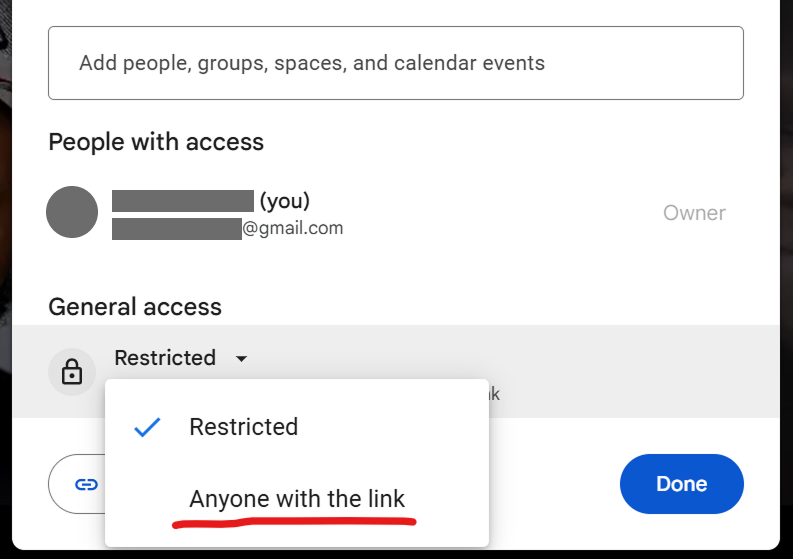
Upload the video to your Google Drive and make it accessible to "Anyone with the link":
1. In Google Drive, double-click the video file to open it.
2. Click the "Share" button in the upper-right corner; a small window will appear.
3. Under General access, change the setting from "Restricted" to "Anyone with the link".
4. Click Done
Image
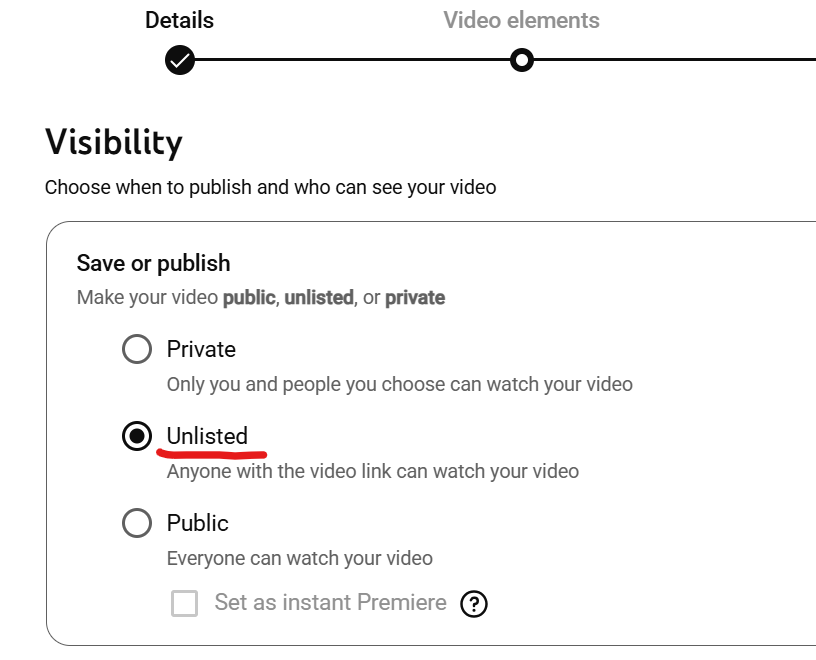
1. Upload the video to your YouTube account.
2. After uploading, under Visibility, select Unlisted (Anyone with the link can view).
Image
in the YouTube app on mobile:
Image
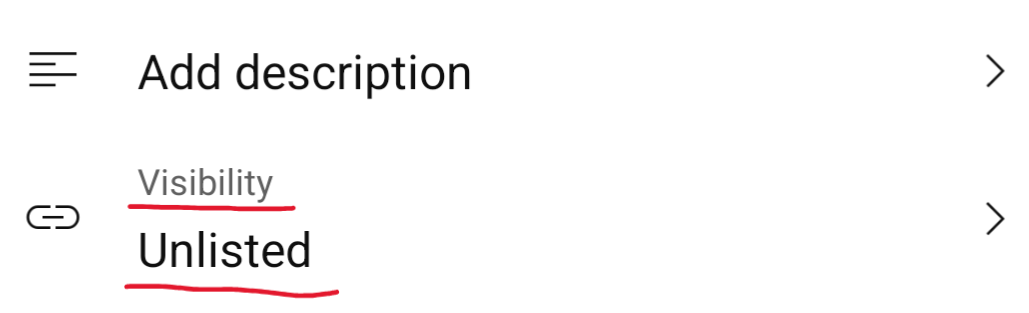
If you have already uploaded the video and forgot to change the visibility, you can do the following:
1. Go to https://studio.youtube.com/ and open the Content section on desktop, or tap Edit video on mobile
2. Under Visibility, change the setting from Private to Unlisted.
Submit your Workspace Project Proposal
* If you'd like to resubmit your proposal, simply upload it one more time. Only your most recent submission will be considered.
To submit your proposal, you must be logged in to your student account.
*If the "Submit" button is inactive, check if you started your application for this camp here
When submitting a video as a link, please ensure that you can access the video using the link in an incognito/private window. If we cannot access your video through the link you provided, your solution will not be awarded any points.
If you have any questions, feel free to reach out to info@sigmacamp.org
We look forward to seeing your proposal!