
SigmaCamp 2026: QQ Submission
The Qualification Quiz (QQ) consists of 12 problems in Math, Physics, Biology, Chemistry, Computer Science, and Linguistics & Applied Sciences. For each subject, there are two problems: an easier 5-point problem and a more challenging 10-point problem.
Applicants admitted to the camp through the Problem of the Month (POM) contest should have been notified by email.
- If you were admitted through POM, you do not need to submit the QQ for that camp, but you must still submit an essay.
- If you were admitted to one camp through POM but wish to also apply to the other camp (SigmaCamp or SigmaWest), 30% of your POM score will be added to your QQ score, capped at 20 points.
- If you participated in POM but were not admitted among the top scorers, your effort will not be forgotten: 30% of your total POM score will be added to your QQ score.
- All other applicants must submit QQ solutions.
QQ Office Hours
To support applicants during the QQ portion of the SigmaCamp application, we are offering Office Hours where students can receive one-on-one guidance from our staff. These sessions are designed to help applicants get unstuck and move in the right direction - without giving away answers. Learn more about it here

(MARCH 9: Correction to Math 10pt (a), Physics 5pt)
How to Approach the QQ
- You are not expected to solve all of the problems. Do as many problems as you can (this will, of course, increase your chances of getting accepted), but even if you solve just one problem, please send us your solution anyway.
- You do not need to fully solve a problem—we are most interested in seeing your thought process. Even if you only make partial progress, please submit your work!
- Explain your reasoning clearly: Even if you arrive at the correct answer, the most important for us is to see your steps and thought process.
- You are not allowed to use any LLMs (ChatGPT, Claude, DeepSeek, etc.) to solve any of the problems.
- Collaborating with other applicants on the QQ is prohibited. But you can use the Internet, books, and even help from someone (who is not another applicant), but state precisely what sources you have used to solve each problem.
- You do not have to submit all solutions at once; you can submit some and return to this page later to submit more. You can submit your solutions in any order.
How to Prepare and Submit Your Solution
For each problem, you must submit a VIDEO and a PDF file. For Computer Science (CS) problems, you must also submit a code file.
PDF file (and a Code file for CS problems):
- Submit your solution for each problem as a single PDF file.
- You may type your solution or handwrite it and scan it as a PDF.
- For Computer Science problems, the only allowed languages are Python 3 or Java. Please upload a .py or .java file by clicking the "Add another file" button in the form below.
You should see the message "For security reasons, your upload has been renamed to..." for Python files.
Video explaining your solution:
- Each video must be at most 2.5 minutes long for each problem.
- Your solution must be narrated, but you do not need to show your face. Acceptable formats include:
- Screen-sharing slides or a drawing app (e.g., MS Paint) with narration
- Recording a whiteboard, paper, or easel with narration (contents may be pre-written)
- Speaking directly to the camera
- Submit your video as a link (uploaded to Google Drive, YouTube, Dropbox, etc.).
- Please make sure that you can access your video using the link in an incognito/private window.
If you are applying to both SigmaCamp and SigmaWest:
You only need to submit your QQ solutions once, through either application. Your total score will be applied to both applications automatically.
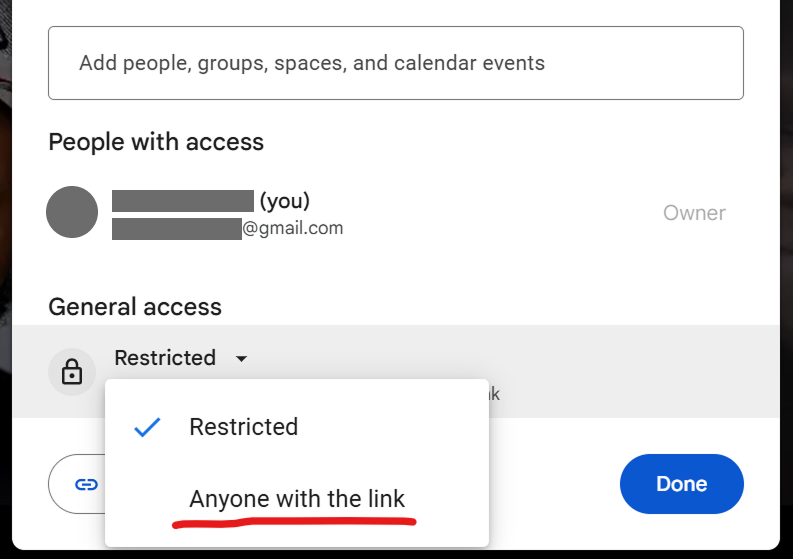
Upload the video to your Google Drive and make it accessible to "Anyone with the link":
1. In Google Drive, double-click the video file to open it.
2. Click the "Share" button in the upper-right corner; a small window will appear.
3. Under General access, change the setting from "Restricted" to "Anyone with the link".
4. Click Done
Image
1. Upload the video to your YouTube account.
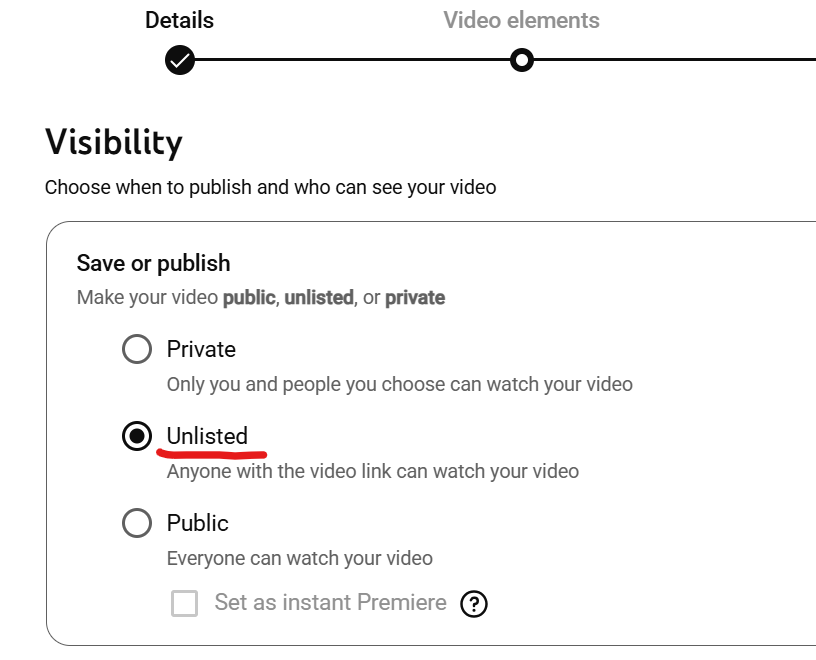
2. After uploading, under Visibility, select Unlisted (Anyone with the link can view).
Image
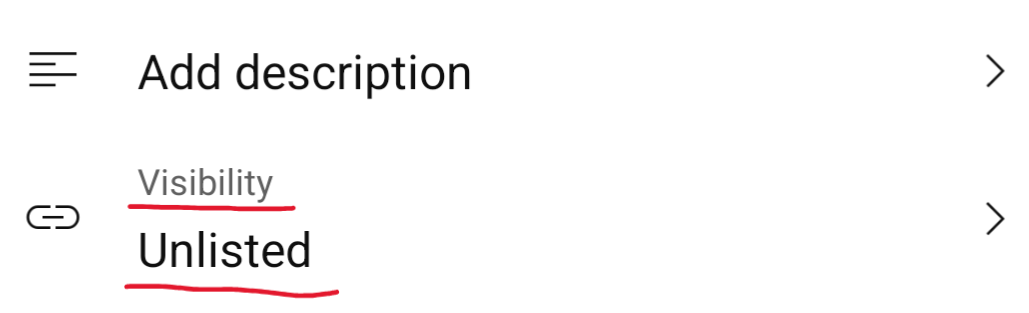
in the YouTube app on mobile:
Image
If you have already uploaded the video and forgot to change the visibility, you can do the following:
1. Go to https://studio.youtube.com/ and open the Content section on desktop, or tap Edit video on mobile
2. Under Visibility, change the setting from Private to Unlisted.
Submit your QQ solution for SigmaCamp
To submit your solution, you must be logged in to your student account.
*If the "Submit" button is inactive, check if you started your application for this camp here
When submitting a video as a link, please ensure that you can access the video using the link in an incognito/private window. If we cannot access your video through the link you provided, your solution will not be awarded any points.
If you have any questions, feel free to reach out to info@sigmacamp.org